Outback Guidance Help Center home page
Community Submit a request
Sign in
  1. Outback Guidance
  2. Terminals
  3. STX (Click for more articles)
  4. Basic Guidance

Articles in this section

  • STX field guidance basics
  • How do I set an A=B line (straight guidance) on my STX?
  • How do I update my "B" point on the STX?
  • How do I snap an A=B line to my current location in the STX?
  • How do I shift the A=B line in the STX?
  • How do I use a previously made A=B line on my STX?
  • How do I create Contour guidance lines on the STX?
  • How do I create pivot guidance on the STX?
  • How do I snap a pivot line to my current location on the STX?
  • How do I shift a pivot guidance line on the STX?
See more

How do I return to the last worked area of my field using the STX?

Joel Dietrich Sr. Technical Support - Outback Guidance
  • June 17, 2020 15:30
  • Updated
Follow

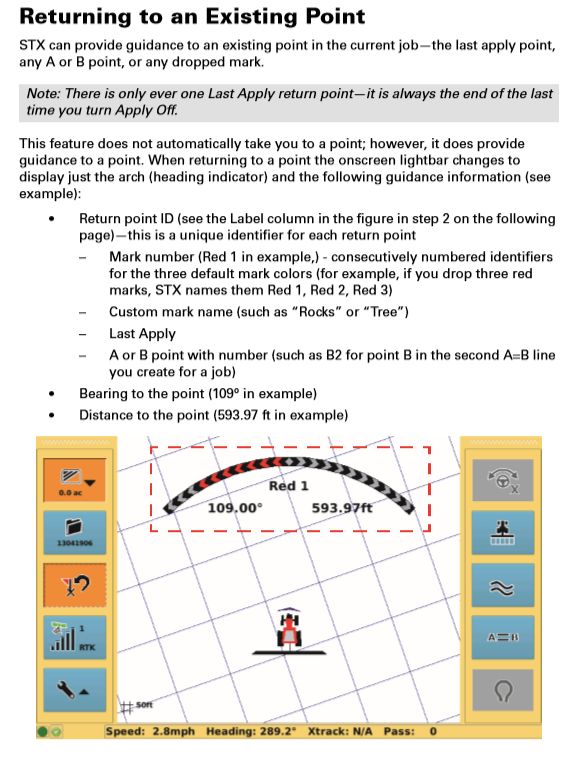
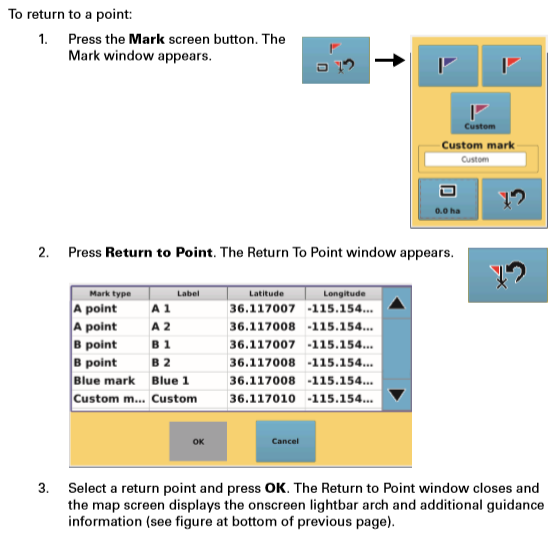
mceclip0.pngmceclip1.png

  • Facebook
  • Twitter
  • LinkedIn
Was this article helpful?
0 out of 0 found this helpful
Have more questions? Submit a request
Return to top
Outback Guidance